

By Mara Santos, Host Academy Editor, PinasBnb
How Philippine Guests Actually Pay for a Booking
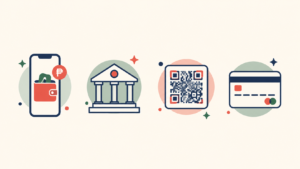
GCash
GCash is a widely used payment option among Philippine consumers, and for many hosts it’s the first thing a guest offers when a booking is confirmed. Guests typically send payment to the host’s own GCash number and share a screenshot or reference number as proof.
Bank transfer
Bank transfer (including InstaPay) remains common, particularly for larger payments or guests who prefer a bank record over a wallet app.
QR payments
QR codes let a guest pay by scanning rather than typing in numbers — useful at check-in or for guests who are more comfortable with a one-tap confirmation.
Card payments
Card payments are available to guests booking with hosts on PinasBnb’s Growth or Pro plans, through the host’s own Stripe account — this isn’t included on the Starter plan.
The Part Nobody Talks About: Confirming and Matching Payment
Here’s where most of the actual work happens, and where most guides about “accepting GCash” stop short.
Checking a payment against an inquiry
A guest sends “Paid na po!” with a screenshot. Now you’re checking your GCash app, finding the transaction, and mentally matching it to a conversation that might be one of a dozen you’re juggling that week — especially if it started on Messenger (see Getting Direct Bookings Through Facebook & Messenger).
Matching a payment to the right reservation
If you have more than one property, or more than one guest asking about the same dates, matching a specific payment to a specific reservation isn’t automatic — it’s you, cross-referencing an app screen against a messaging thread.
The risk of confirming too early
It’s tempting to block the calendar the moment a guest says they’ve paid, before you’ve actually verified it. That’s how a booking gets confirmed on a payment that turns out to be short, delayed, or never sent.
What This Costs You in Time and Risk
Multiply the matching problem above across a busy weekend, several properties, or a period when you’re relying on memory instead of a system, and the risk compounds: no single record ties a payment to a reservation, and if a guest disputes what they paid or when, there’s no clean trail to point to — just a scattered set of screenshots and message threads.
What a Structured Payment-to-Booking Workflow Looks Like
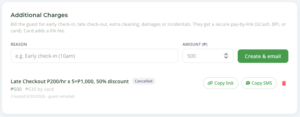
PinasBnb includes a Payment Requests feature on every plan: instead of waiting for a guest to send an unprompted GCash transfer with a message attached, you send a request for a specific amount, tied to their booking. That gives you one clear ask instead of an open-ended “please pay whenever” — a request you can point back to, rather than reconstructing the agreed amount from a chat thread after the fact.
Frequently Asked Questions
Do guests still pay via GCash directly, or does PinasBnb change that?
Guests still pay via your own GCash, BPI, or QR codes — PinasBnb doesn’t change how guests pay, it lets you send a specific,
traceable Payment Request tied to their reservation instead of relying on an unprompted transfer.
Can I still accept bank transfer if a guest prefers it?
Yes — bank transfer/BPI is supported on every plan.
Does PinasBnb support Maya?
Not currently stated as a supported method. If this changes, this article should be updated — do not imply Maya support until confirmed.
Do I need Growth or Pro to use Payment Requests?
No — Payment Requests are available on every plan, including Starter.

2 comments on “How Filipino Hosts Actually Get Paid — GCash, Bank Transfer, and Where Manual Tracking Breaks Down”